Before You Give an AI Coding Agent Access to Your Repository: A Practical Security Checklist
A practical security checklist for AI coding agents: least privilege, isolation, secrets, prompt injection, MCP review and human approval for risky actions.
AI coding agents are becoming part of everyday software development. They can inspect repositories, modify files, execute terminal commands, install dependencies, and interact with external services. This makes them far more capable than traditional code completion tools.
But it also changes the security equation.
When an AI coding agent has access to your repository, it may also have access to sensitive configuration files, developer credentials, internal source code, and tools that can affect production systems. A malicious instruction hidden in a GitHub issue, README file, or external webpage could potentially influence what the agent does next.
The question is no longer simply whether an AI agent can write good code. It is whether the agent has the right level of access to do its job safely.
Before connecting an AI coding agent to a real project, developers should establish a few security boundaries.
Why AI Coding Agents Introduce New Security Risks
Traditional coding assistants primarily suggest code for developers to review and apply. Agentic coding tools can take additional actions independently, depending on their configuration and permissions.
For example, an agent might:
- Read source code and configuration files across a repository.
- Execute shell commands and run tests.
- Install or update dependencies.
- Access external services through APIs or MCP servers.
- Modify CI/CD workflows and deployment configurations.
- Read files containing environment variables or credentials.
These capabilities create an important security concern: an agent can combine access to private information, exposure to untrusted content, and the ability to take actions.
OWASP’s DevSecOps guidance identifies this combination as a central part of the threat model for AI agents and MCP integrations.
A developer might trust the agent’s original task, but the agent can also encounter instructions from sources that the developer did not intend to trust.
That distinction matters.
1. Start With the Principle of Least Privilege
An AI coding agent should receive only the permissions required for its current task.
Giving an agent unrestricted repository access, administrative privileges, and full terminal permissions may seem convenient, but it unnecessarily expands the potential impact of a mistake or attack.
Consider a typical development task: fixing a validation issue in an API endpoint.
The agent may need to:
- Read application source files.
- Modify the relevant controller and validation logic.
- Run unit tests.
- Review its own changes.
It probably does not need access to production deployment credentials, cloud administration tools, or unrelated repositories.
A practical permission model might look like this:
| Resource | Suggested permission |
|---|---|
| Application source code | Read and write |
| Test directories | Read and write |
| Production “.env” files | Deny |
| SSH private keys | Deny |
| Git push and merge | Require approval |
| Production deployment | Human approval |
| External network access | Restrict to task requirements |
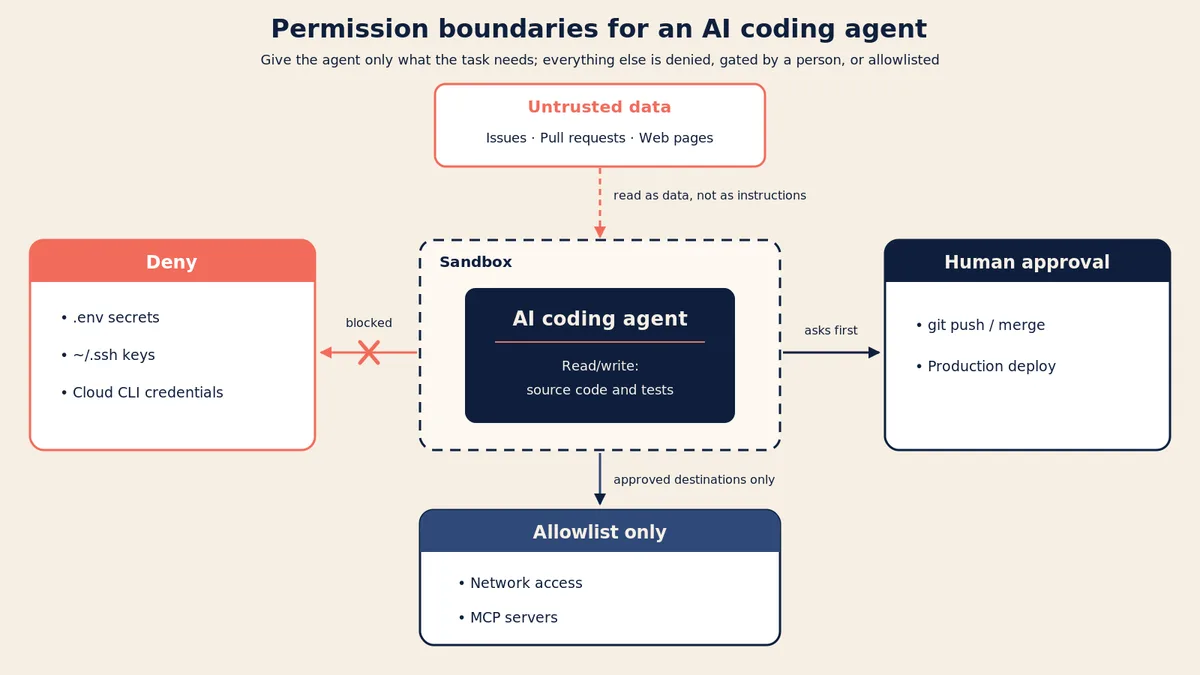
OWASP recommends starting from deny and explicitly allowing the operations an agent needs.
The objective is not to make the agent less useful. It is to limit what can happen if something goes wrong.
2. Run Agents in an Isolated Environment
Repository permissions alone are not enough.
If an agent executes commands on a developer’s machine, it may inherit access to files, credentials, and services available to that environment.
For example, a local development machine might contain:
- GitHub authentication credentials.
- SSH keys.
- Cloud provider CLI configurations.
- Database connection strings.
- Docker credentials.
- Local environment files.
A compromised agent context could expose information available to its execution environment.
A safer approach is to use an isolated development environment, such as:
- A dedicated development container.
- A disposable virtual machine.
- An isolated cloud development workspace.
- An agent-provided sandbox with clearly understood boundaries.
The environment should contain only the project files and tools required for the task.
Network access should also be restricted where possible. If an agent only needs to run local tests, unrestricted outbound network access may not be necessary.
One important distinction: a sandbox is not automatically a complete security boundary. Developers still need to understand which tools, filesystem paths, network connections, and credentials remain accessible outside it.
3. Keep Secrets Away From the Agent
One of the most important precautions is protecting credentials.
AI coding agents may need to work with applications that use databases, cloud services, payment providers, or third-party APIs. However, that does not mean they need direct access to production credentials.
Avoid exposing:
- Production database passwords.
- Cloud access keys.
- Long-lived API tokens.
- Private SSH keys.
- Deployment credentials.
- Personal access tokens with broad permissions.
Instead, use separate credentials with limited permissions and short lifetimes.
For example, an agent working on a feature might use a temporary GitHub token restricted to a single repository and the permissions needed for that task.
For database work, provide a development database with test data rather than a production connection.
Also remember that moving a secret into an environment variable does not automatically protect it. If the agent can read that environment variable, it may be able to expose its value.
The safest approach is to keep sensitive credentials outside the agent’s accessible environment and provide access through controlled services when necessary.
4. Understand Prompt Injection in the Development Workflow
Prompt injection is not limited to chat interfaces.
An AI coding agent may read many kinds of external or user-controlled content while working on a repository:
- GitHub issues.
- Pull request descriptions and comments.
- README files.
- Dependency documentation.
- Error logs.
- External webpages.
- MCP tool responses.
Some of these sources could contain malicious instructions designed to manipulate the agent.
Imagine a developer asks an AI agent to investigate a bug reported in a public GitHub issue.
The issue contains an instruction telling the agent to ignore its original task, read a sensitive configuration file, and send its contents to an external endpoint.
A human developer would recognize that this instruction is unrelated to fixing the bug. An AI agent, however, may process it as part of its context.
This is an example of indirect prompt injection.
The practical defense is to treat external content as untrusted data rather than authoritative instructions.
Developers should:
- Review content from untrusted contributors before allowing agents to act on it.
- Restrict which files and tools agents can access.
- Require approval for sensitive operations.
- Inspect unexpected changes after processing external content.
- Avoid giving agents unrestricted network access.
Prompt injection cannot be reliably eliminated simply by writing a stronger system prompt. Limiting the permissions and capabilities available to the agent is an important way to reduce the potential impact.
5. Be Careful With MCP Servers and External Tools
The Model Context Protocol (MCP) allows AI applications to connect to external tools and data sources.
For developers, this can be useful. An agent might use MCP to access GitHub, query a database, inspect documentation, or interact with an issue tracker.
However, every additional integration introduces another potential security boundary.
Before connecting an MCP server, consider:
- Source: Is the server maintained by a trusted organization or developer?
- Permissions: What files, services, and operations can it access?
- Credentials: Does it require broad API tokens or administrative access?
- Network: Can it communicate with destinations outside the intended scope?
- Updates: How are changes to the server and its dependencies reviewed?
Avoid enabling every available MCP integration simply because it is convenient.
Use only the tools required for the current workflow, scope their permissions, and review changes to their configurations.
An MCP integration should be treated like any other software dependency that can access internal systems.
6. Review Every Change Before Merging
AI-generated code should follow the same review standards as code written by a developer.
An agent may produce a working implementation while introducing unrelated changes, weakening security controls, or modifying configuration files that were outside the original task.
Pay particular attention to changes involving:
- Authentication and authorization.
- Cryptographic operations.
- Database access.
- Dependency management.
- CI/CD configuration.
- Dockerfiles and deployment scripts.
- Environment and security settings.
Passing tests is not sufficient proof that a change is safe.
An AI agent might also modify or remove tests to make a failing test suite pass. Review whether the tests still verify the intended behavior, rather than simply checking whether the final command returns a successful result.
A practical review process should include:
- Inspecting the complete Git diff.
- Checking for unexpected file modifications.
- Running existing automated tests.
- Running static analysis and security scanning.
- Reviewing newly introduced dependencies.
- Confirming that sensitive configuration has not changed unexpectedly.
For security-sensitive changes, independent human review is particularly important.
7. Keep Human Approval for High-Impact Actions
AI coding agents can automate many repetitive development tasks, but not every action should be fully autonomous.
Some operations have consequences that are difficult to reverse.
Examples include:
- Merging changes into protected branches.
- Deploying to production.
- Deleting data.
- Changing access permissions.
- Modifying cloud infrastructure.
- Sending sensitive information to external services.
These operations should require explicit human approval.
Approval should also provide enough information for the developer to make an informed decision. Showing the actual command, target resource, and requested permissions is more useful than simply displaying a generic confirmation message.
The goal is to automate routine work while retaining human control over consequential decisions.
A Practical AI Coding Agent Security Checklist
Before allowing an AI coding agent to work on a real repository, use this checklist.
| Security control | What to verify |
|---|---|
| Repository access | Only the required repository is accessible |
| File permissions | Sensitive files and directories are restricted |
| Execution environment | Agent runs in an isolated environment |
| Credentials | No unnecessary production secrets are exposed |
| Network access | Outbound connections are appropriately restricted |
| MCP integrations | Only reviewed and necessary tools are enabled |
| Prompt injection | External content is treated as untrusted |
| Code review | All changes are inspected before merging |
| Security testing | Existing security checks remain enabled |
| Human approval | Production and destructive operations require approval |
Not every project needs the same level of restriction. A personal experiment and a production application have different risk profiles.
However, the basic principle remains the same: give an agent enough access to complete its task, but not enough access to compromise everything around it.
Final Thoughts
AI coding agents can make software development faster, but greater autonomy also creates new responsibilities for developers.
The biggest mistake is treating an AI agent like an ordinary code completion tool when it can actually interact with files, execute commands, access services, and modify infrastructure.
Security should therefore be part of the setup process, not something added after an agent has already been given unrestricted access.
Start with limited permissions, isolate the execution environment, protect credentials, review external integrations, and keep human approval for high-impact operations.
The objective is not to prevent AI agents from doing useful work. It is to make sure they can do that work without receiving more trust than the task requires.