What Is a Reverse Proxy? Proxy vs Reverse Proxy vs Load Balancer
A reverse proxy sits in front of your servers and handles incoming requests. See how it differs from a forward proxy, load balancer, API gateway, and CDN, and when you need one.
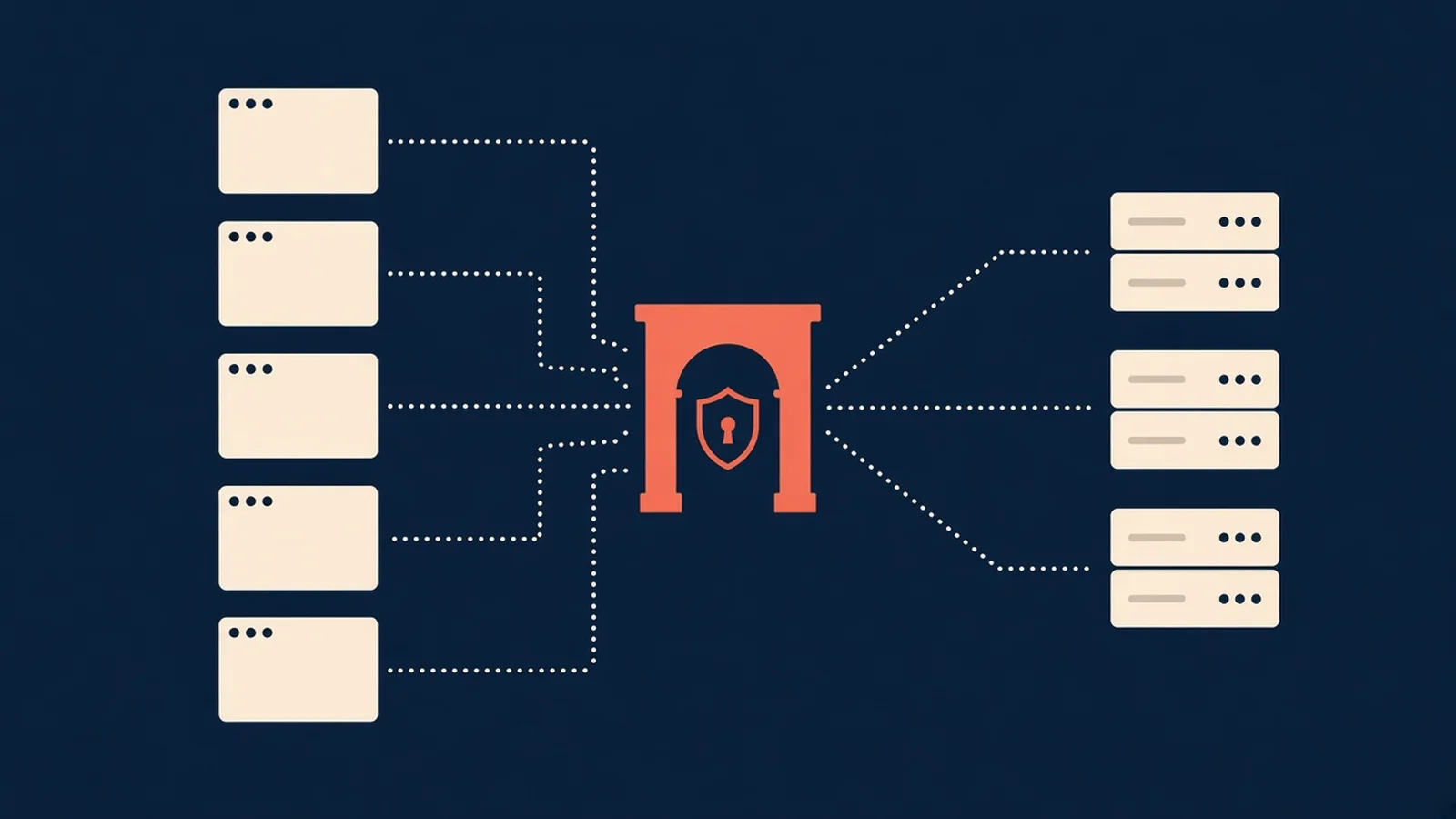
A reverse proxy is a server that sits in front of one or more application servers. It receives requests from users, forwards them to the right server behind it, and sends the response back as if it had produced the answer itself. The user only ever talks to the proxy.
The nginx and Caddy details below were checked against their official documentation on 9 November 2026.
What a reverse proxy is
The HTTP standard, RFC 9110, names three common kinds of intermediary: proxy, gateway, and tunnel. Its definition of a reverse proxy is the “gateway”:
A “gateway” (a.k.a. “reverse proxy”) is an intermediary that acts as an origin server for the outbound connection but translates received requests and forwards them inbound to another server or servers.
In plain terms, the client thinks the reverse proxy is the website. nginx and Caddy call the servers behind it upstreams or backends.
RFC 9110 lists what gateways are often used for: to “encapsulate legacy or untrusted information services, to improve server performance through ‘accelerator’ caching, and to enable partitioning or load balancing of HTTP services across multiple machines.”
Note the vocabulary: in RFC 9110, “gateway” means reverse proxy, not the “API gateway” category compared further down. MDN uses the word the other way round, describing “a forward proxy, or gateway, or just ‘proxy’.”
The request path
The figure below follows one request through a reverse proxy in front of three app servers, with a forward proxy above it for comparison.
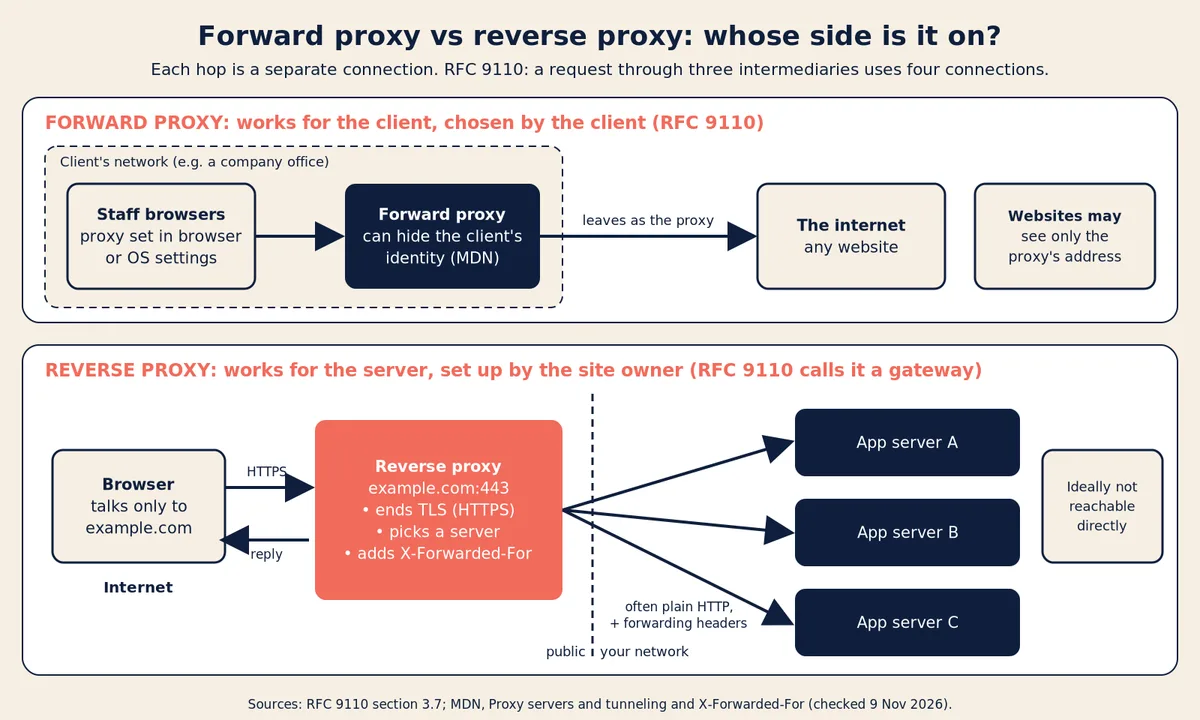
RFC 9110’s own example of three intermediaries says a message travelling the whole chain “will pass through four separate connections.” That is why details of the original connection, such as the client’s IP address or whether it used HTTPS, get lost unless the proxy passes them on in headers.
Forward proxy vs reverse proxy
The difference is whose side the proxy is on.
- A forward proxy works for the client. RFC 9110 defines a “proxy” as “a message-forwarding agent that is chosen by the client, usually via local configuration rules.” A company network that sends all staff web traffic through one proxy is a forward proxy setup.
- A reverse proxy works for the server. The website owner puts it in front of their own servers. The client usually doesn’t know it exists.
MDN puts it in one line: “Forward proxies can hide the identities of clients whereas reverse proxies can hide the identities of servers.”
What a reverse proxy does
- TLS termination. The proxy holds the certificate and handles HTTPS, so the application servers don’t have to. nginx’s HTTPS guide shows the
sslparameter onlistenplusssl_certificateandssl_certificate_key. Caddy’s quick-start says it serves the proxy over HTTPS “automatically and by default” when it knows the domain name and DNS and ports 80 and 443 are set up. The hop from proxy to backend is separate: Caddy’s docs say that by default “connections are made to the upstream over plaintext HTTP.” - Load balancing. The proxy spreads requests across several servers. nginx’s load balancing guide says its “reverse proxy implementation in nginx includes load balancing” for HTTP, HTTPS, and other protocols. When no method is configured, nginx uses round-robin. Caddy’s
reverse_proxydirective defaults to arandompolicy. - Caching. MDN lists caching static content, such as pictures, as a reverse proxy use case. RFC 9110 calls this “accelerator” caching. nginx’s proxy module has
proxy_cachedirectives for it. - Compression. MDN also lists compressing content “to speed up load time.”
- A single front door. One public address can route to many services by hostname or path, and the backend servers don’t need to be reachable from the internet. Microsoft’s API gateway guide describes the same benefit for gateways: an intermediary that “prevents direct exposure of application services to clients.”
Caching also reduces how much data your origin has to send out, which AWS says can lower hosting costs; how much depends on how cacheable your traffic is.
Reverse proxy vs load balancer vs API gateway vs CDN
These terms overlap, and one piece of software can play several roles. nginx and Caddy are reverse proxies that also load balance, and Microsoft says an API gateway “acts as a reverse proxy.” The table compares what each is mainly for, per the sources cited.
| Forward proxy | Reverse proxy | Load balancer | API gateway | CDN | |
|---|---|---|---|---|---|
| Sits in front of | A group of clients, between them and the internet | One site’s own servers | A pool of servers running the same app | A set of backend services or APIs | Your origin, from servers in many locations near users |
| Works for, and set up by | The client, usually via local configuration (RFC 9110) | The site owner; clients usually don’t know it’s there | The site owner | The API owner | The site owner |
| Main job | Send client requests out to any server; can hide the client’s identity (MDN) | Receive requests for a site and forward them to its own servers (RFC 9110) | Distribute traffic across a pool of servers (AWS) | A “centralized entry point” that routes requests to services and handles cross-cutting tasks (Microsoft) | Serve copies of content from servers in many locations, closer to users (MDN) |
| Typical extras | Shared caching and security services for an organization (RFC 9110) | TLS termination, caching, compression, load balancing (MDN, nginx, Caddy) | A choice of balancing methods, such as round-robin or least connections (nginx) | Authentication, rate limiting, request aggregation, TLS termination (Microsoft) | Caching at points of presence, spreading traffic spikes across servers (AWS) |
| Understands HTTP? | Yes, for HTTP proxies | Yes | Depends: AWS describes Application Load Balancers routing HTTP requests and Network Load Balancers routing on IP addresses | Yes | Yes |
| Examples named in the sources | Proxies chosen by local configuration (RFC 9110) or a PAC file; Tor, for anonymity (MDN) | nginx, Caddy; nginx and HAProxy (Microsoft) | nginx and Caddy load balancing; Elastic Load Balancing (AWS); Azure Application Gateway (Microsoft) | Azure API Management, Azure Application Gateway, or a reverse proxy such as nginx (Microsoft) | Amazon CloudFront (AWS) |
| When you need it (our guidance) | You need to control or route outbound traffic for a group of users | You want one public entry point and TLS in one place for one or more apps | You run more than one copy of an app | Many APIs need shared authentication, rate limiting, or routing | Users are far from your origin, or much of your content is cacheable |
Table notes: row-by-row sources are RFC 9110 and MDN for forward and reverse proxies, AWS on load balancing, Microsoft’s API gateway guide, and MDN and AWS on CDNs. Products are listed only because those pages name them, not as a ranking. The last row is editorial guidance, and the categories overlap: one product can fill several columns.
Two distinctions the table compresses. A load balancer is not always a reverse proxy: AWS separates application load balancers, which “look at the request content, such as HTTP headers,” from network load balancers, which “examine IP addresses and other network information.” An API gateway is a reverse proxy with an API focus: Microsoft lists offloadable features such as authentication, rate limiting, and response caching, and names a reverse proxy server such as nginx as one way to build a gateway.
A minimal nginx and Caddy example
Both configs below accept requests for example.com and spread them across two local app servers on ports 8001 and 8002. They are trimmed from the official docs’ examples to show the shape, not to be pasted into production unchanged.
nginx
This goes inside the http block. The upstream block is from the upstream module; the proxy_* lines are from the proxy module, whose own example sets Host and X-Real-IP this way.
upstream app {
    server 127.0.0.1:8001;
    server 127.0.0.1:8002;
}

server {
    listen 80;
    server_name example.com;

    location / {
        proxy_pass       http://app;
        proxy_set_header Host            $host;
        proxy_set_header X-Real-IP       $remote_addr;
        proxy_set_header X-Forwarded-For $proxy_add_x_forwarded_for;
    }
}
Per the nginx docs:
upstream appdefines a group of servers, balanced by default with “a weighted round-robin balancing method.”proxy_pass http://app;sends requests to it.proxy_set_header Host $host;matters because nginx’s default isproxy_set_header Host $proxy_host;, which sends the upstream’s name instead of the host the user asked for.$proxy_add_x_forwarded_foris the client’sX-Forwarded-Forheader “with the$remote_addrvariable appended to it.” If the client sent no such header, it is just the client’s address.
One gotcha: proxy_set_header directives are inherited from the outer level “if and only if there are no proxy_set_header directives defined on the current level.” Set one header inside a location, and the outer ones stop applying there. The example uses plain HTTP to stay short; for HTTPS, add the listen 443 ssl and certificate lines from nginx’s HTTPS guide.
Caddy
Adapted from the reverse_proxy docs example that load-balances “all requests between 3 backends”:
example.com {
	reverse_proxy localhost:8001 localhost:8002
}
Caddy’s documented defaults do a lot here. Because the site address is a domain name, Caddy will try to get a publicly trusted certificate and serve HTTPS. It balances with the random policy, sets or augments X-Forwarded-For, sets X-Forwarded-Proto and X-Forwarded-Host on the request to the backend, and otherwise passes headers, including Host, through unchanged.
Scenario: two apps on one VPS behind one domain
This is an illustrative setup assembled from Caddy’s documentation, not a walk-through of a server we run. The values (example.com, ports 3000 and 8080) are examples.
Starting point. One virtual private server with one public IP address. It runs a web app and a separate API, and you want both under https://example.com, with the API at /api/.
- Point the domain at the server and open ports 80 and 443. Caddy’s reverse proxy quick-start says it serves HTTPS “automatically and by default” once the domain’s DNS points at the machine and those ports are reachable.
- Make the apps listen on 127.0.0.1 only, for example the web app on port 3000 and the API on 8080. Then only the proxy can reach them. That is also the condition MDN attaches to trusting
X-Forwarded-For: if a server can be reached directly, no part of the header can be trusted for security uses. - Route by path with
handleblocks. Caddy’shandledocs say only the first matchinghandleblock runs, and ahandlewith no matcher “acts like a fallback route”:
example.com {
	handle /api/* {
		reverse_proxy 127.0.0.1:8080
	}
	handle {
		reverse_proxy 127.0.0.1:3000
	}
}- Know what each app receives.
handlekeeps the path, so the API sees requests starting with/api/. To strip the prefix you would usehandle_path, but thereverse_proxydocs warn to “be aware of the subfolder problem.” The Caddy community explanation those docs link to says most apps assume they are served from the web root, so links and redirects such as/css/site.csspoint outside the prefix and break. As in the example above, Caddy reaches the apps over plain HTTP and sets theX-Forwarded-*headers. - Check the defaults that matter later. Caddy’s load-balancing retries are off by default, and it waits on a slow backend with no response timeout (see the table under Pitfall 2).
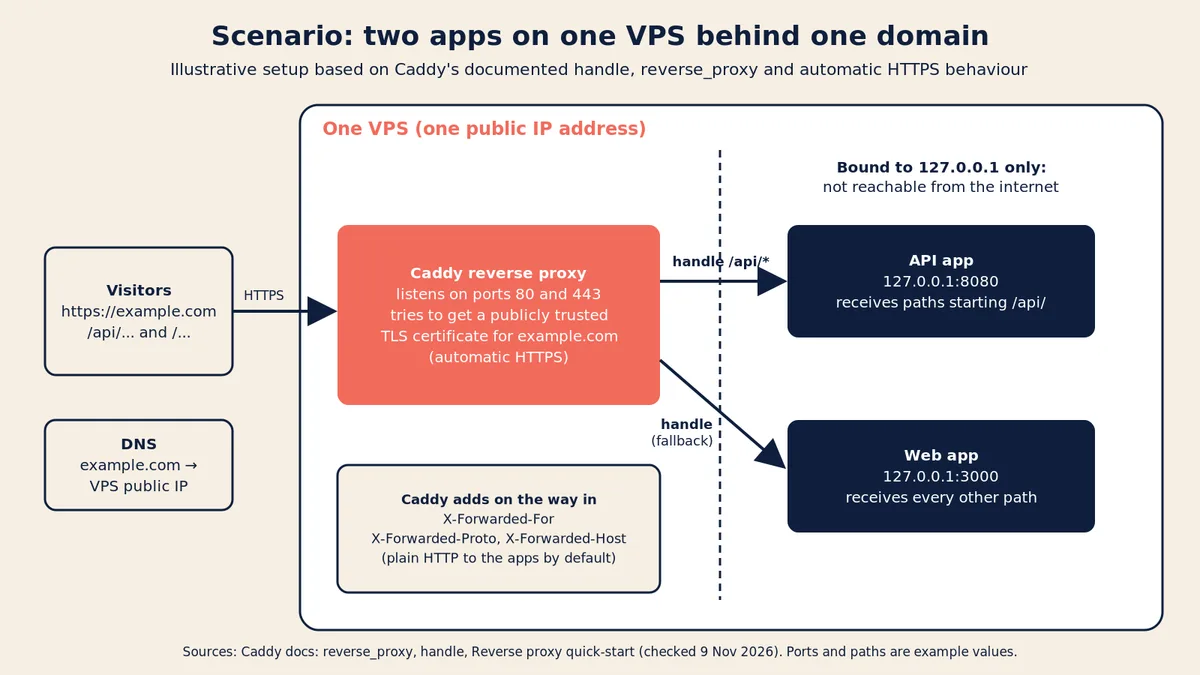
handle and reverse_proxy docs; example values.In nginx, the same split is two location blocks, each with its own proxy_pass. Remember the inheritance rule above: a proxy_set_header inside either block cancels the outer ones for that block.
Pitfall 1: X-Forwarded-For and the real client IP
Behind a reverse proxy, your app sees every request coming from the proxy. MDN explains that a server behind proxies “only sees the final proxy’s IP address, which is often of little use.” The usual fix is the X-Forwarded-For header, “a de-facto standard header” in MDN’s words. With well-behaved proxies, the list reads left to right from the client toward the server:
X-Forwarded-For: 203.0.113.195, 2001:db8:85a3:8d3:1319:8a2e:370:7348, 198.51.100.178The trap is that the header is just text, and the client can send its own. If your edge proxy appends to whatever arrived, as nginx’s $proxy_add_x_forwarded_for does, the leftmost entries can be anything the client chose to write. MDN’s security notes are blunt:
- Any security-related use, “such as for rate limiting or IP-based access control,” must only use IP addresses added by a trusted proxy.
- If the server can be reached directly from the internet, “even if it is also behind a trusted reverse proxy,” then no part of the list “can be considered trustworthy or safe for security-related uses.”
MDN describes two common ways to pick a trustworthy client IP, both reading from the right: count back by the known number of trusted proxies, or skip every address on a list of trusted proxy IP ranges and take the first one that isn’t on it.
How nginx and Caddy handle it
nginx has the realip module for this. Its docs note it “is not built by default” and needs the --with-http_realip_module configuration parameter when nginx is built. Trimmed from its example config:
set_real_ip_from  192.168.1.0/24;
real_ip_header    X-Forwarded-For;
real_ip_recursive on;
set_real_ip_from “defines trusted addresses that are known to send correct replacement addresses.” With real_ip_recursive on, nginx uses “the last non-trusted address” in the header, the right-to-left method MDN describes. List the ranges of whatever sits in front of nginx, such as your load balancer or CDN.
Caddy takes a stricter default. Its reverse_proxy docs say that for X-Forwarded-* headers, “by default, the proxy will ignore their values from incoming requests, to prevent spoofing.” If something else sits in front of Caddy, such as a CDN, you tell it which ranges to trust with the trusted_proxies global option, which the docs strongly recommend over setting it per proxy. By default Caddy parses the trusted header left to right. The docs recommend enabling trusted_proxies_strict, which parses right to left, when the proxies in front append addresses to the right, “as the left-most IP address may be spoofed by the client.” Based on the docs’ example:
{
	servers {
		trusted_proxies static 203.0.113.0/24
		trusted_proxies_strict
	}
}
Replace 203.0.113.0/24 (a documentation range) with the real ranges of the proxy in front of Caddy.
The standard alternative: Forwarded
RFC 7239, from 2014, defines a standard Forwarded header that carries the same information in one field, for example Forwarded: for=192.0.2.60;proto=http;by=203.0.113.43. MDN notes the header is “much less frequently used” than X-Forwarded-For. It has the same trust problem: RFC 7239 says the header “cannot be relied upon to be correct, as it may be modified, whether mistakenly or for malicious reasons, by every node on the way to the server, including the client making the request.”
Both headers carry the client’s IP address, which RFC 7239 notes “is considered to be privacy sensitive by many people,” so forward and log it only as far as you need to.
Pitfall 2: timeouts and retries
A reverse proxy adds its own timeouts between the client and your app. When they don’t match how long your app takes, users see errors your app never logged. RFC 9110 defines the two status codes involved:
- 502 Bad Gateway: the proxy “received an invalid response from an inbound server.”
- 504 Gateway Timeout: the proxy “did not receive a timely response from an upstream server.”
The defaults differ between the two servers covered here:
| Setting | nginx default | Caddy default |
|---|---|---|
| Connecting to the backend | proxy_connect_timeout 60s (docs: “cannot usually exceed 75 seconds”) |
dial_timeout 3s |
| Waiting on the backend’s response | proxy_read_timeout 60s, measured “between two successive read operations,” not for the whole response |
response_header_timeout and read_timeout: no timeout |
| Sending the request to the backend | proxy_send_timeout 60s, between two successive writes |
write_timeout: no timeout |
With nginx’s defaults, a backend that sends nothing for 60 seconds has its connection closed. Raise the timeout only for routes that need it.
Retries can repeat things that shouldn’t be repeated
A load-balancing proxy can retry a failed request on another server. That helps a page load and can hurt a payment.
RFC 9110 is explicit: “A proxy MUST NOT automatically retry non-idempotent requests.” A method is idempotent when repeating a request has the same intended effect as sending it once. In RFC 9110 that covers PUT, DELETE, and safe methods such as GET and HEAD, but not POST.
Per their docs:
- nginx.
proxy_next_upstreamdecides when a request goes to the next server. Its default iserror timeout. The docs add that “requests with a non-idempotent method (POST,LOCK,PATCH) are not passed to the next server if a request has been sent to an upstream server,” unless you explicitly add thenon_idempotentoption. Retrying is also “only possible if nothing has been sent to a client yet.”proxy_next_upstream_triesandproxy_next_upstream_timeoutcan cap retries; both are unlimited (0) by default. - Caddy. Load-balancing retries are “disabled by default.” If you turn them on with
lb_retriesorlb_try_duration, a request whose connection to the backend failed can always be retried. But if the connection succeeded and the round trip then failed, “by default, onlyGETrequests are retried.” You can widen that withlb_retry_match.
Both servers let you opt in to retrying non-idempotent requests, which RFC 9110 says a proxy must not do automatically. If you enable it, make sure the endpoint is safe to repeat, for example because it checks an idempotency key.
Do I need a reverse proxy?
This section is editorial guidance based on the documented features above, not a benchmark or a rule.
You probably want one if:
- You run several services on one machine. One proxy can listen on ports 80 and 443 and route by hostname or path to different local ports, as in the VPS scenario above. Without one, each service typically needs its own public port or address.
- You self-host and want HTTPS handled in one place, for example with Caddy’s automatic HTTPS, instead of in each app.
- You run more than one copy of your app and need something to spread requests across them.
- You want to cache or compress responses without changing application code.
You may not need your own if:
- Your hosting platform already terminates TLS and routes requests for you. Check its docs for what it already does before adding another layer, and find out which forwarding headers it sets so you can configure trust correctly.
- You run one app process with no TLS, caching, or routing needs. Then a proxy is optional.
If you do add one, two habits matter more than which software you pick: make sure the backends can only be reached through the proxy, the condition MDN attaches to trusting X-Forwarded-For, and decide on purpose which requests the proxy may retry.
FAQ
What is the difference between a proxy and a reverse proxy?
A forward proxy is chosen by the client and sends its requests out to any server. A reverse proxy is set up by the site owner and receives requests for that site. Forward proxies can hide clients; reverse proxies can hide servers.
Is a load balancer a reverse proxy?
Sometimes. An application load balancer that reads HTTP requests works much like one; a network load balancer that routes on IP addresses does not.
Is an API gateway a reverse proxy?
Yes, in Microsoft’s description: an API gateway “acts as a reverse proxy” and adds API features such as authentication and rate limiting.
Is nginx a reverse proxy?
nginx can act as one through its proxy_pass directive, and its docs describe load balancing as part of its reverse proxy implementation. Caddy’s reverse_proxy directive does the same job in Caddy.
Does a reverse proxy hide my server’s IP address?
MDN says reverse proxies “can hide the identities of servers,” because clients connect only to the proxy. That only holds if the backends can’t also be reached directly, which also matters for trusting X-Forwarded-For.
Why does my app log the proxy’s IP instead of the user’s?
Because the app’s connection comes from the proxy. Have the proxy pass the client address in X-Forwarded-For or X-Real-IP, and have the app or the proxy trust that header only from known proxy addresses, using nginx’s realip module or Caddy’s trusted_proxies.